为什么公众号文章适合先用 Markdown 写
Markdown 让作者先关注结构:标题层级、段落、列表、引用、代码块和图片。对于技术文章、产品说明、读书笔记和长文草稿,这种写法比直接在富文本编辑器里排版更稳定。
问题在于,公众号后台并不直接接受一篇完整的 Markdown 文件。你需要把 Markdown 转成带样式的富文本,再粘贴进去。Sheaf 在导出时会内联样式,尽量保留预览中的排版效果。
推荐工作流
- 在 Sheaf 中完成正文,使用分屏预览检查标题层级和段落节奏。
- 插入图片后确认图片路径或图床地址可访问。
- 开启中英文间距,让中文、英文、数字之间的间隔更适合阅读。
- 用 AI 改写时先审阅 diff,再应用到正文。
- 导出公众号 HTML,复制到公众号后台后做最后检查。
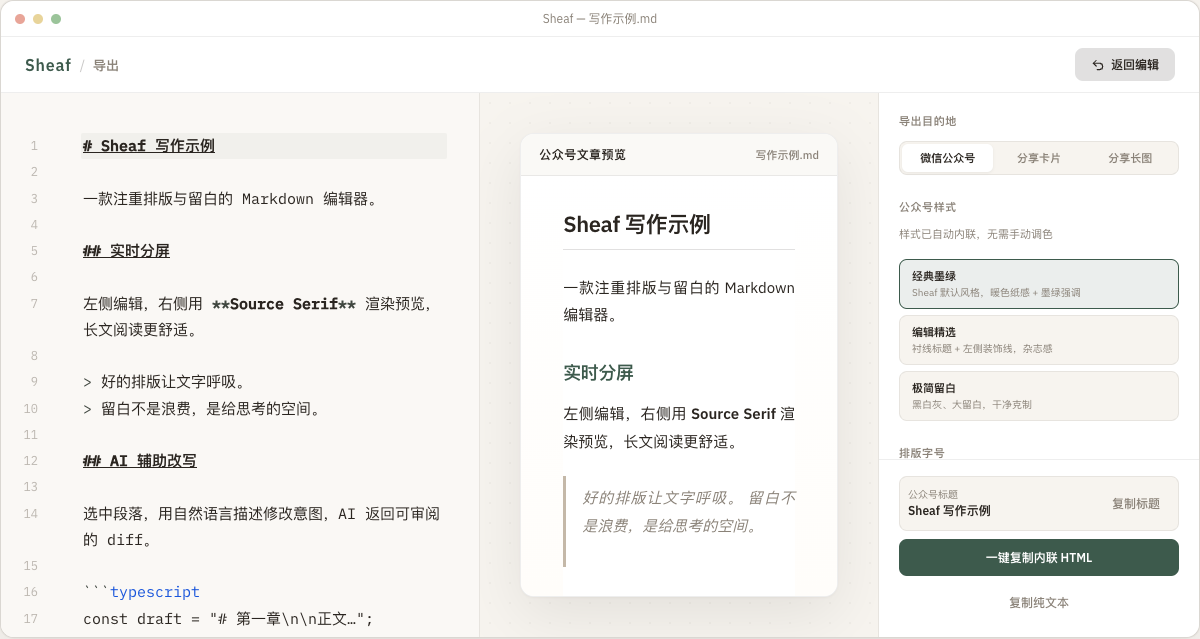
导出时需要重点检查什么
| 内容类型 | 检查点 |
|---|---|
| 标题 | 确认一级标题不会重复出现在封面标题和正文开头。 |
| 代码块 | 确认语言标记正确,长代码在移动端不会破坏阅读。 |
| 图片 | 确认图片已经上传到稳定地址,或能被公众号后台正确接收。 |
| 公式和图表 | 复杂内容发布前建议在手机端预览一次。 |
适合哪些公众号作者
Sheaf 更适合认真写长文的作者:技术教程、AI 产品笔记、开发日志、知识管理文章、读书笔记和产品更新说明。如果你的文章包含代码块、图表、公式或很多中英文混排内容,先用 Markdown 再导出会更省心。
Why write in Markdown before publishing
Markdown lets you focus on structure first: headings, paragraphs, lists, quotes, code blocks, and images. That is useful for technical tutorials, product notes, reading notes, and long-form articles.
The problem is that many publishing tools expect rich text, not a raw Markdown file. Sheaf converts your draft into HTML with inlined styles so the pasted result is closer to the preview.
Recommended workflow
- Finish the Markdown draft in Sheaf and check heading hierarchy in split preview.
- Confirm images use stable local paths or hosted URLs.
- Enable CJK spacing if the article mixes Chinese, English, and numbers.
- Review AI edits as diffs before applying them.
- Export rich HTML and paste it into your blog, newsletter, or CMS editor.
What to check before publishing
| Content | Check |
|---|---|
| Headings | Make sure the article title and first heading are not duplicated. |
| Code blocks | Use language markers and check long code on narrow screens. |
| Images | Use stable public URLs when your publishing platform needs hosted images. |
| Math and diagrams | Preview complex content on the target platform before publishing. |
Who this workflow is for
It works best for technical writers, product builders, and newsletter authors whose drafts include code, diagrams, formulas, or careful typography.