选择适合你的安装包
| 平台 | 建议 |
|---|---|
| macOS Apple Silicon | 适合 M1、M2、M3、M4 等 Apple Silicon Mac,优先下载 arm64 版本。 |
| macOS Intel | 适合 Intel 芯片 Mac,下载 x64 版本。 |
| Windows | 下载 Windows 安装包。Linux 版本计划中,当前可先关注 GitHub Releases。 |
安装前你需要知道什么
Sheaf 不要求注册账号,也不接管你的云盘。Markdown 文件仍然是普通的 .md 文件,可以继续用 Git、Finder、iCloud Drive、Dropbox 或任何同步工具管理。
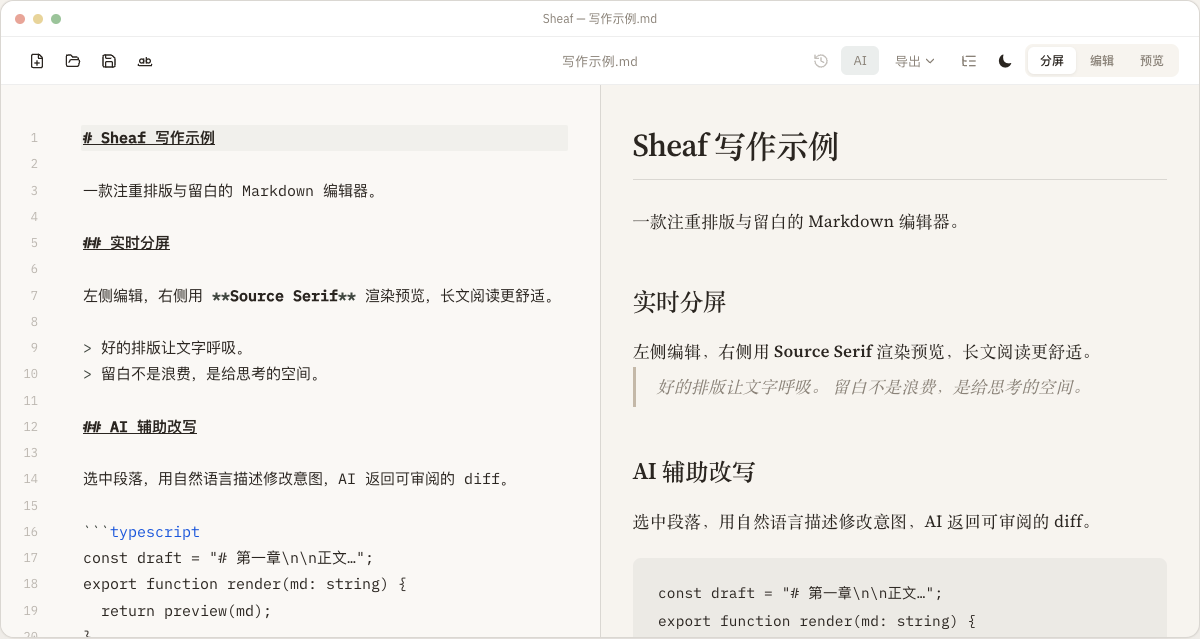
AI 改写功能默认不会直接覆盖正文。Sheaf 会展示 diff,你确认后再应用;每次应用前也会保存版本快照,方便回滚。
适合哪些写作场景
技术文档
分屏预览、代码高亮、Mermaid 图表和 KaTeX 公式适合写工程文档。
公众号和博客
把 Markdown 导出为带内联样式的富文本 HTML,减少排版返工。
长文草稿
大纲导航和本地文件保存让长稿更容易组织。
AI 辅助润色
用自然语言要求 AI 改写段落,并在接受前审阅差异。
Choose the right installer
| Platform | Recommendation |
|---|---|
| macOS Apple Silicon | For M1, M2, M3, M4, or later Macs. Choose the arm64 build. |
| macOS Intel | For Intel-based Macs. Choose the x64 build. |
| Windows | Download the Windows installer. Linux builds are planned. |
Before you install
Sheaf does not require an account and does not move your writing into a proprietary database. Files stay as ordinary .md documents, so you can manage them with Finder, Git, iCloud Drive, Dropbox, or any sync tool you trust.
AI rewriting does not overwrite your draft automatically. Sheaf shows a diff, lets you decide what to apply, and saves a version snapshot before each accepted edit.
Common writing workflows
Technical docs
Split preview, code highlighting, Mermaid diagrams, and KaTeX math for engineering writing.
Blogs and newsletters
Export Markdown as rich HTML with inlined styles for publishing tools and CMS editors.
Long drafts
Outline navigation and local file storage make long-form writing easier to manage.
AI-assisted editing
Ask AI to rewrite a paragraph in plain language, then review the diff before applying it.